 RGXbot
Before you start
Correct map floor and edition with Special Areas editor.
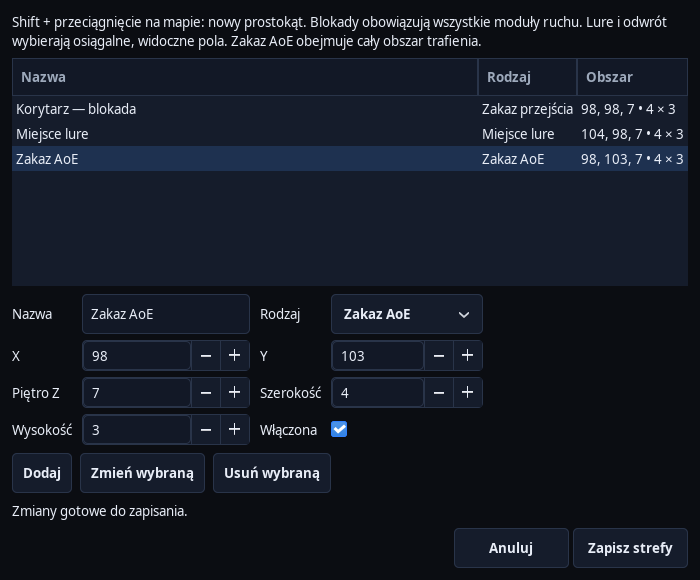 Open full screenshot ↗
Screenshot of the actual development-version interface. Settings and data are examples.
Select the rectangle
Open Map, center the view and set the Z floor. Hold Shift and drag with the left mouse button. You can also use Special Areas - edit zones... or RMB on the map.
Name it and check its boundaries
In the editor, set the name, X, Y, floor, width and height. One rectangle can have up to 128 × 128 fields. Draw a small zone first to easily check its operation.
Select type
A crossing ban blocks the fields for traffic. AoE prohibition protects fields from configured area attacks. The lure spot and retreat spot indicate the preferred positions for these behaviors; you set their thresholds in Targetingu.
Save zones
Add creates an entry, Edit selected updates the selection and Delete selected removes it. Save areas saves the list and current edits. Then File → Save saves the full configuration to XML.
Check the map and operation
Red marks a movement block, purple an AoE restriction, yellow a lure area and blue a retreat area. Hiding the Areas layer only hides the drawing. Disable a rule with the Enabled switch in the editor.
Check overlapping areas
A passage block takes precedence over a lure or retreat spot in the same square. These places must be reachable on a known map. The preview of lines between WPTs does not recalculate zones; evaluate the actual movement and footprint of the character.
After completing the guide
The map shows saved zones, and the appropriate modules take into account their rules.
Troubleshooting
Disabling a layer does not disable the lock
Open the editor, uncheck Enabled for this zone and save.
The lure area is not used
Check the Lure action in the rule, floor, limits and clear path. If there is no available field, the current route is used.