 RGXbot
Before you start
Monster rule, healing and proven route section. Feature requires release with extended Targetingiem.
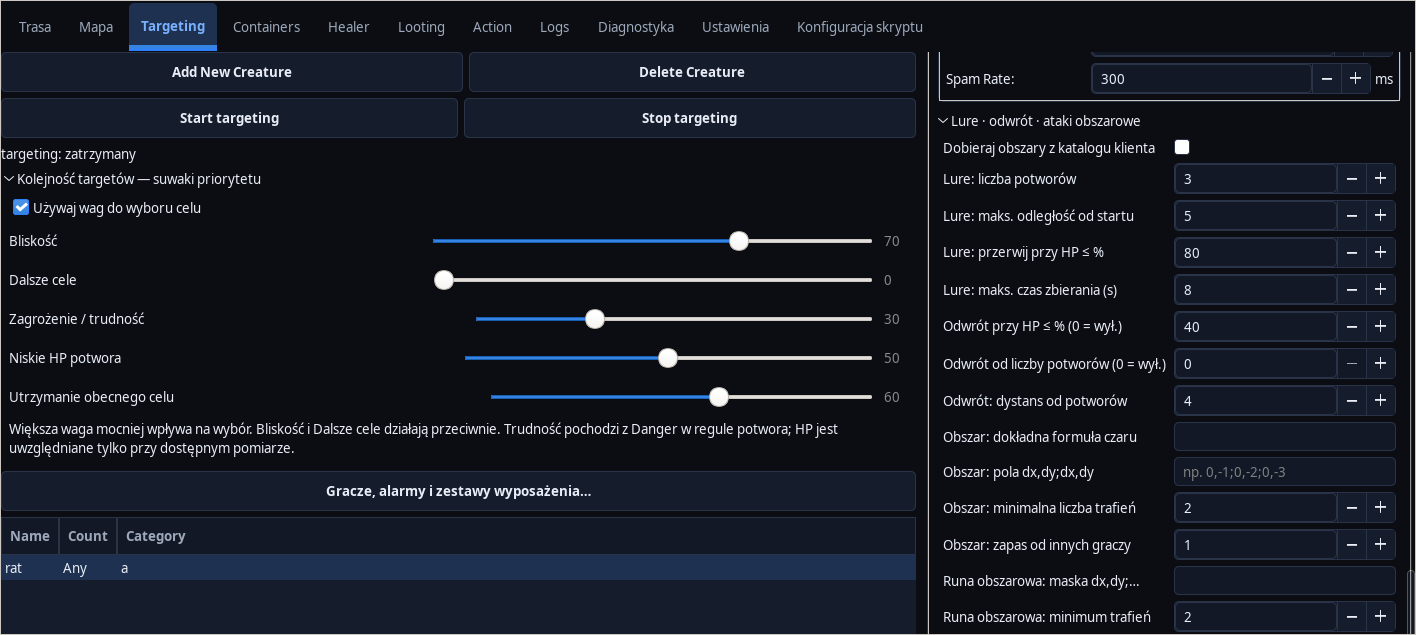 Open full screenshot ↗
Screenshot of the actual development-version interface. Settings and data are examples.
Select the Lure action
Select a monster rule in Targeting and set Lure. Expand Lure · retreat · area attacks. Gathering applies to creatures matching this rule.
Set collection boundaries
Enter the target monster count, maximum distance from the gathering start, minimum HP and time limit. For a short trial: 3 monsters, 5 tiles, 80% HP and 8 seconds. Adjust the limits to your character's durability.
Indicate a direction or place
Prepare waypoints along which to collect. You can also draw a Special Area of the Lure Place type. The engine prefers the reachable field of this zone on the known map of the same floor.
Set retreat
Add a threshold for HP or monster numbers and expected retreat distance. The optional Return Point zone indicates the preferred point. Simply drawing a zone does not trigger an escape - a condition in the rule must be met.
Watch the end of the lure
Check the transition from gathering to fighting when a limit is reached or the character arrives at the area. Gathering should stop when HP drops. If no known path exists, the lure phase ends instead of searching indefinitely.
Check the return after the reverse
Once the situation improves, watch for a return to regular combat. HP hysteresis limits mode switching every moment. Save rules and zones to your profile.
After completing the guide
The collection has a clear end and the retreat responds to the conditions set.
Troubleshooting
Does not select a zone
Check activity, floor, field occupancy, blocks and reachability in the current view.
Retreat is blocked
Check logs and clear path; configuration does not create passage through surrounding monsters.