 RGXbot
Before you start
A Targeting rule, the appropriate spell or rune, and a release with the area catalog.
 Open full screenshot ↗
Screenshot of the actual development-version interface. Settings and data are examples.
Open the catalog
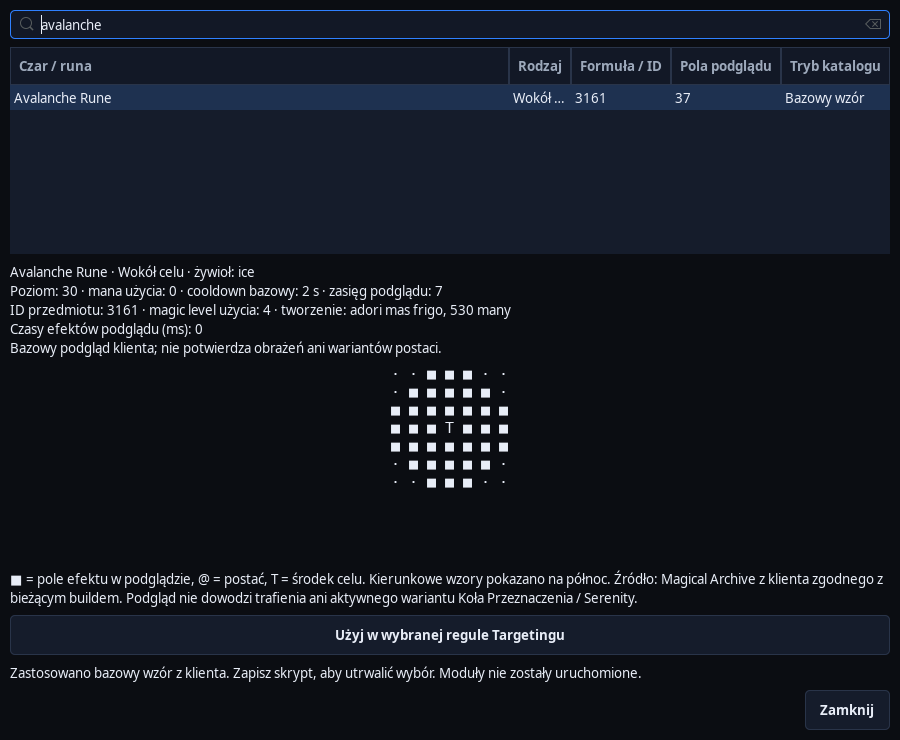
Select a monster rule and choose Spell and rune area catalog…. Search by name, spell words or rune ID. Examine the drawing: the center and direction determine the tiles covered by the attack.
Assign an item to a rule
Select Use in the selected rule Targetingu. Check the spell or rune ID entered and the Select areas from the client catalog option. Selecting from the catalog alone does not trigger combat.
Set the required hits
Determine the minimum number of hits and margin from players. Also set the range for the rune. For example, Avalanche has 37 fields in the base view of the supported client, Explosion has 9 fields, and Sudden Death is a single target.
Check the monster rules
The engine rejects areas containing disallowed creatures and searches for a position that meets the minimum hit count and includes the current target. For a rune, it selects the best allowed tile; for a spell, it may adjust position and direction.
Add protected fields
Special Area of the AoE Prohibition type disqualifies the roll if at least one square of the configured area intersects the zone. Player, known view and line of fire controls remain active. Automatic spell areas are conservative when other players are present.
Confirm the result in the game
Monitor position, target, and rune or mana consumption. The catalog shows the base pattern, not guaranteed damage or every Wheel modification. Chain spells, delayed spells, and other unsupported patterns may be for informational purposes only.
After completing the guide
The attack is selected only when the area conditions are met; an unsafe or unknown arrangement prevents casting.
Troubleshooting
The attack is not performed
Check players, margin, minimum hits, range, PZ, mana, cooldown and AoE restrictions. The entire required area must be covered by the read.
The catalog does not allow you to assign a spell
Check the restriction description. Animation preview is not always sufficient to automatically determine damage.