 RGXbot
Before you start
Monster names for the selected hunting area and configured healing.
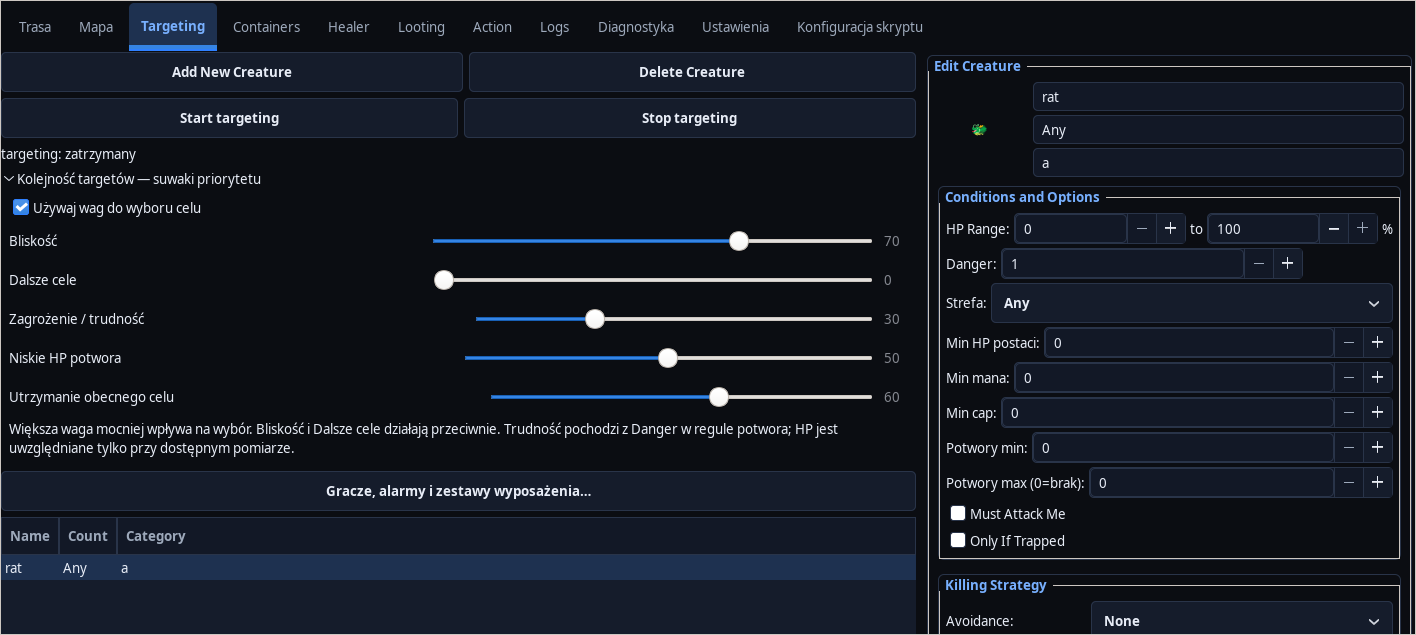 Open full screenshot ↗
Screenshot of the actual development-version interface. Settings and data are examples.
Add a monster rule
In Targeting, add the name of the creature. Select Attack, Lure or Ignore and set the priority. For monsters with different threats, create separate rules instead of one random setting for everything.
Set your distance and behavior
Match your stance and avoidance to your character. Keep Away or Keep Distance is used to maintain distance. Replenish allowed spells, rune, ammunition and mana reserve; check the required level and range.
Enable selection weights
Expand Target order — priority sliders and select Use weights to choose a target. Each slider ranges from 0 to 100: zero ignores the criterion, while a higher value increases its influence.
Build a simple starting point
Example for an initial observation: Proximity 70, Distant targets 0, Threat / difficulty 30, Low monster HP 50 and Keep current target 60. These are example weights, not a recommendation for every hunting ground.
Check the meaning of the criteria
Difficulty uses the monster rule's Danger value. Low HP works when a measurement is available. Proximity and Distant targets favor opposite selection directions; increasing both may weaken the expected effect. Always and Ignore take precedence over weights.
Observe and correct one weight
Run Targeting on a small group and observe the target. When the goal changes too often, increase the maintenance of the current goal. To finish off more often, increase your low HP. Save settings; turning off the weights restores the previous selection method.
After completing the guide
The order of the goals corresponds to the monster rules and the selected set of weights.
Troubleshooting
Difficulty does not differentiate monsters
Check Danger in individual rules. Equal values make no difference.
The monster is ignored despite the sliders
Check the Ignore action and priority as well as the ability to reach the goal.