 RGXbot
Before you start
Known spells, proper potions and open backpacks available. Choose the thresholds to suit your character.
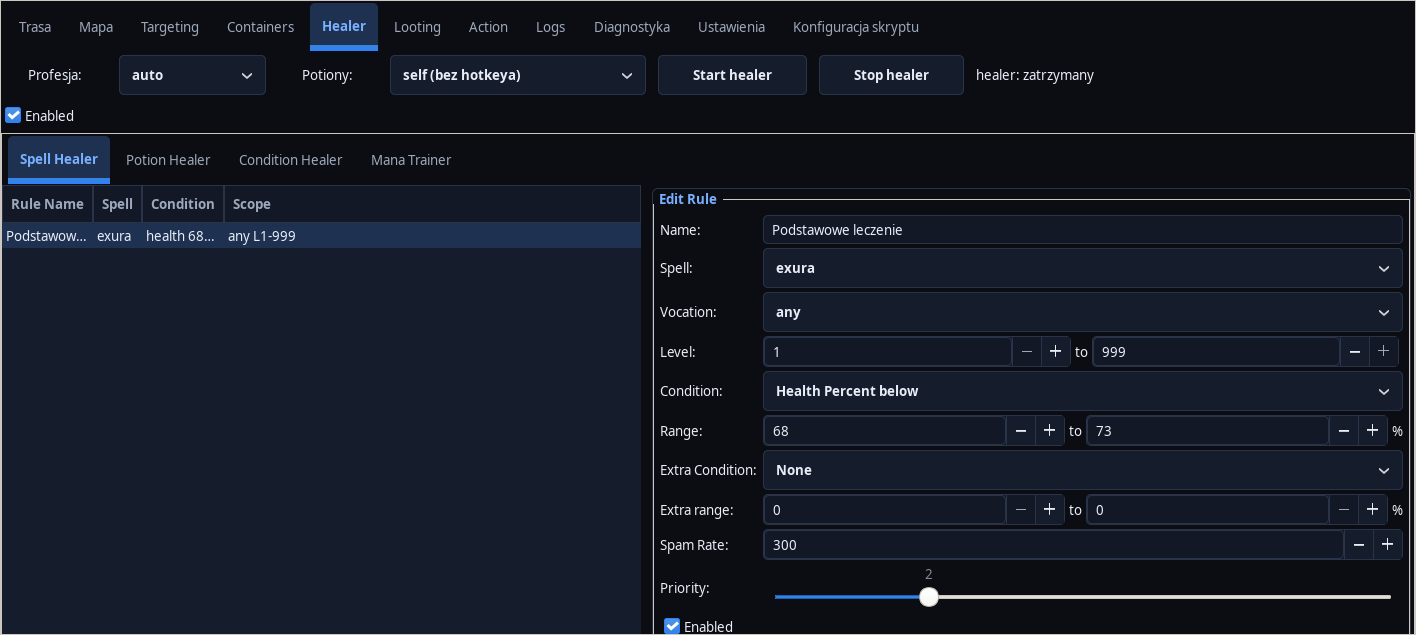 Open full screenshot ↗
Screenshot of the actual development-version interface. Settings and data are examples.
Add a base HP rule
In Healer, choose a spell available for the character's vocation and level. Set the HP condition and priority. The threshold should leave time to react; do not copy values from a character with different durability.
Add an emergency rule
For lower HP, prepare a stronger healing or potion. Indicate the correct item ID and check its stock in open backpacks. Set the emergency rule to a higher priority.
Restore mana
Add a mana potion with your own MP condition. Check if offensive spells and Mana Training leave enough mana for healing. Customer cooldowns continue to apply regardless of the interval set.
Configure Condition Healer
If this section is available in your edition, select a condition, such as paralysis, and the corresponding spell. State rules use the same Healera, priorities and cooldowns as other healing.
Enable and verify execution
Run Healer and monitor its status. If the condition is met, check the change in HP or status and mana or potion consumption. The entry about the sent order itself does not confirm effective treatment.
Save for this character
Persist the settings via File → Save. With shared XML, select your own healing for a character if the profession or spell set differs from the default settings.
After completing the guide
The rules respond to the right conditions, and the character maintains a supply of mana and items.
Troubleshooting
The rule doesn't work
Check HP/MP, profession, level, mana, cooldown, switch and item availability.
The spell removes a different condition
Check the selected state and the actual effect of the spell; the name of the rule does not change the effect of the spell in the game.