 RGXbot
Before you start
Known IDs for your items, open backpacks and free space for removed equipment.
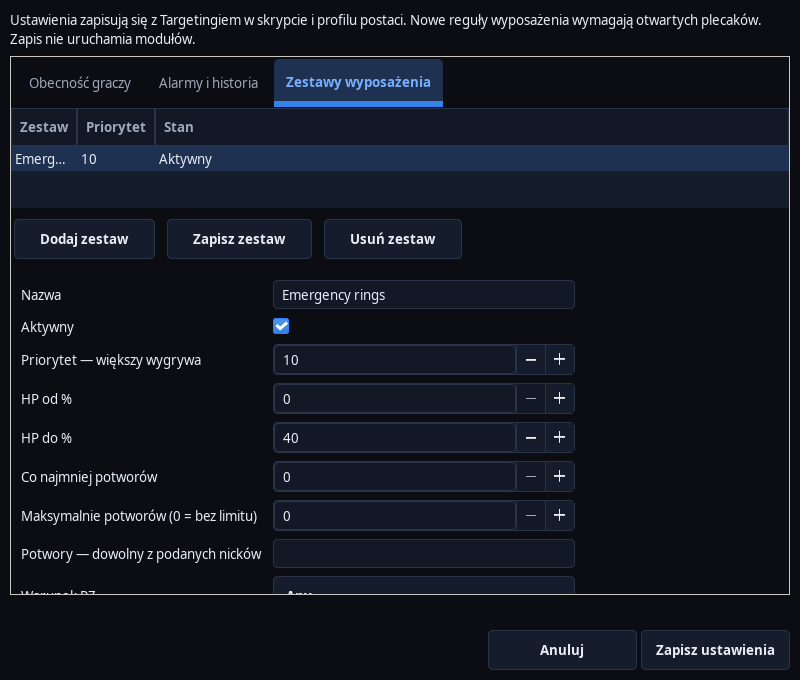 Open full screenshot ↗
Screenshot of the actual development-version interface. Settings and data are examples.
Add a set
Open Targeting → Players, alarms and equipment sets… → Equipment sets. Enter a name, enable the rule and set its priority. Higher priority wins; list order breaks ties.
Set conditions
Set an HP range, monster count or names, and the PZ requirement. For example: a defensive set at low HP and a lower-priority base set for normal conditions. The thresholds must match the equipment actually worn.
Enter slots and ID
Use the format slot=ID, e.g. ring=3051/3088;neck=3057. The first ID indicates the item in the backpack, the next acceptable IDs after activation. This is an example of writing - check the ID and functionality of your items before use.
Prepare a place for replacement
Open the backpack with the new equipment and leave the slot empty. The previous item is first returned to the backpack. Lack of free space may stop the exchange.
Check one change
Once the condition is met, look at the actual slot and backpack. The bot waits for confirmation of the equipment change. An unreliable transfer blocks subsequent automatic operations for this slot until restarting the hunt after checking the equipment.
Verify the base set
After the condition ends, check that the lower-priority rule takes over. The end of an emergency condition alone does not restore the original item unless a base set exists. Save the profile.
After completing the guide
The conditions select the expected set, and each replacement corresponds to a visible change in the inventory.
Troubleshooting
Does not equip an item
Check ID, active variant, source backpack, free slot and set priority.
The slot has been blocked
Check the actual equipment status and the operation log before restarting the hunt.