 RGXbot
Before you start
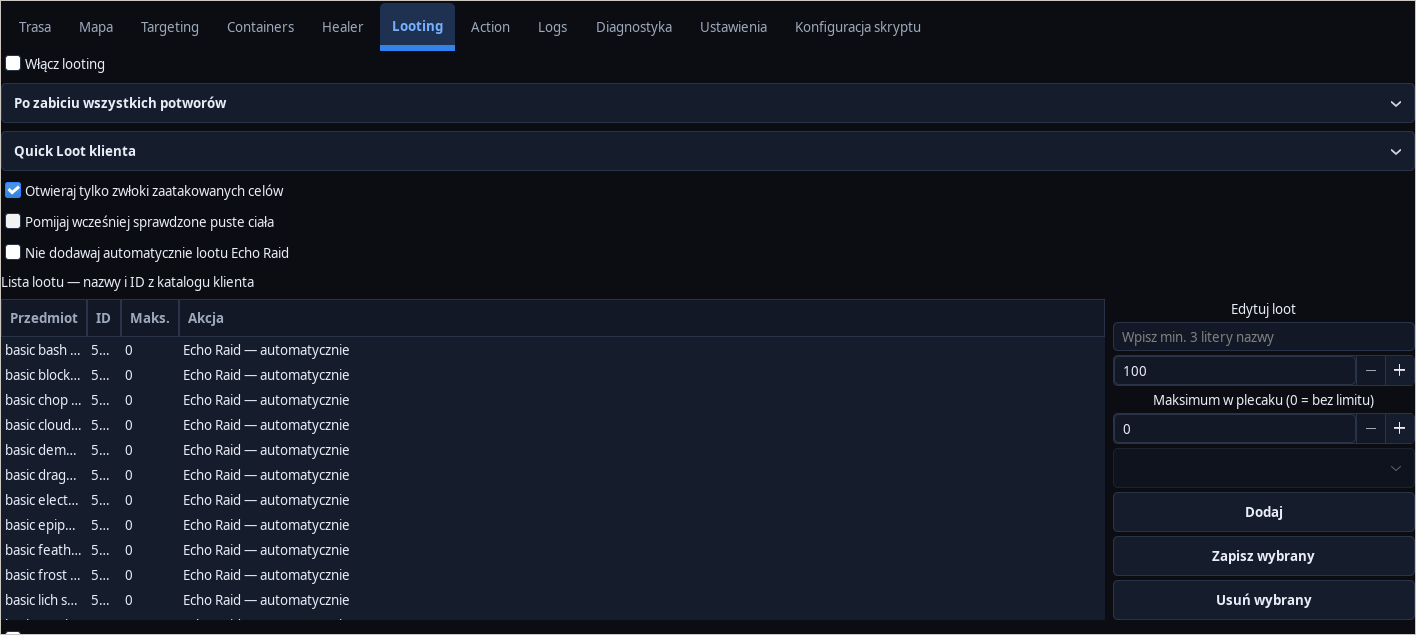
An open destination backpack with space and correct Targeting rules.
 Open full screenshot ↗
Screenshot of the actual development-version interface. Settings and data are examples.
Choose when to loot
Set Looting to collect immediately or after combat. Adjust your choice to the number of monsters and your need to keep your distance.
Choose one method
Quick Loot uses filters set in the game client. Open corpses and pick up only listed loot uses IDs entered in RGXbot. Client filters and the bot's list are separate settings.
Complete your list by Look
For the list method, click the Add by Look button, then perform an in-game Look within 30 seconds. Check the added ID. An empty list does not pick up any items.
Prepare your backpacks
Set backpack rules in Script configuration and open the required containers. Check available space. A busy or closed backpack can pause transfers despite a correct loot list.
Check out one kill of your own
Start the fight and loot. Observe the queue of corpses and the contents of the target backpack. With the list method, the bot handles the stacks one by one and waits for confirmation that the contents have changed.
Separate looting from dropping
The drop list discards surplus items and works separately. Leave dropping disabled until you verify IDs and keep limits. Adding an item to loot does not authorize dropping it.
After completing the guide
The selected items go into the expected backpack and the character returns to the fight or route.
Troubleshooting
Quick Loot collects nothing
Check game filters and backpack space. Processing a queue entry does not prove its contents were collected.
The transfer is waiting
Check open backpacks, free slots and logs. If the outcome is uncertain, first look at the source and target of the operation.