 RGXbot
Before you start
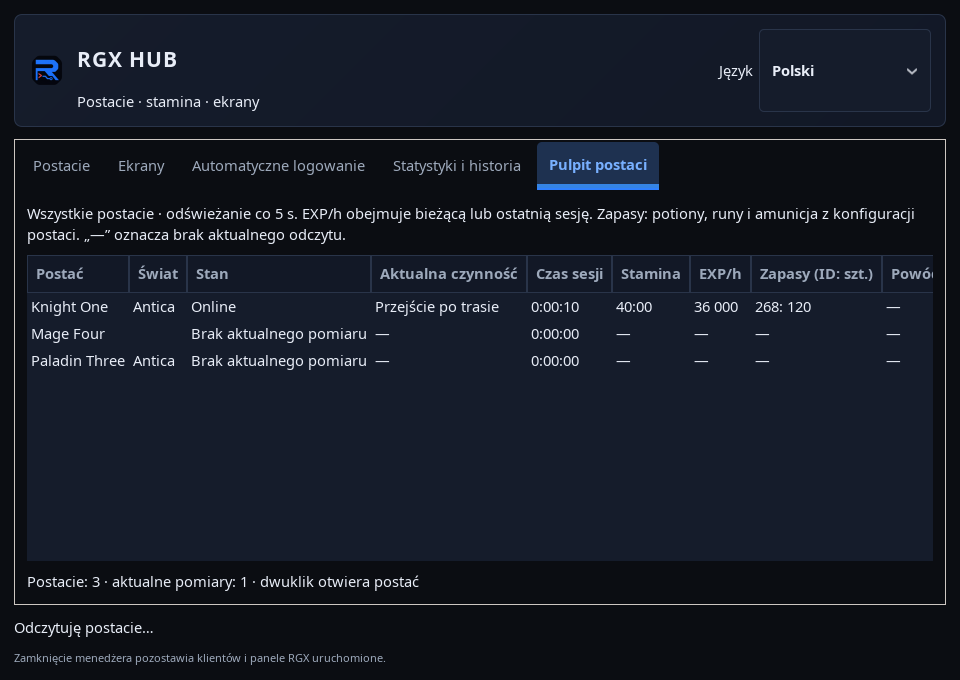
Characters added in the local RGX HUB and current reads from running clients.
 Open full screenshot ↗
Screenshot of the actual development-version interface. Settings and data are examples.
Open local RGX HUB
Launch the application from the system menu and select Character Dashboard. This is the local client and screen manager; the account panel on the website is used for licenses, sessions and data shared by the server.
Choose the correct character
Find the character in the list. Double-click it to open the character view. Check the linked client and profile, especially when several game windows are running.
Read session status
Compare your current activity, session time, stamina and EXP/h. Once a fresh reading is lost, values should not be treated as current; sign - means no current information.
Check supplies
Supplies include potions from active rules Healera and runes and ammo from Targetingu. The counter sees equipment and open backpacks, not closed containers, bank or depository.
Explain the stop
Read the reason for the stop and go to the story or character panel. Check stamina limit, death, player presence and navigation errors before restarting modules.
Check how it starts
In the profile or Edit character, choose Virtual display or Normal desktop — native. The change applies when the game next opens; it does not move a running client to another display.
After completing the guide
For each character, you can indicate the current status, source of supplies and the reason for any arrest.
Troubleshooting
Supplies are undercounted
Open the correct backpacks and check if the item ID is used in active rules.
Values disappeared after disconnection
Wait for a new confirmed reading. No data does not mean zero.